Get Your Coaching Site Indexed on Google Fast
Learn how to get your coaching website indexed on Google fast using Search Console, XML sitemaps, Google Business Profile, and AI crawler access in 2026.

Getting your coaching site indexed on Google is the essential first step to showing up in search results and attracting new clients. Indexing is the process by which Google adds your web pages to its searchable database. Without it, your site is invisible, no matter how good your content is. Tools like Google Search Console, XML sitemaps, and Google Business Profile are the primary ways coaches control this process in 2026. AI-driven search is also changing the rules, making entity clarity and crawler access more important than ever for coaches who want to be found.
What is Google indexing and why does it matter for coaching sites?
Google indexing is defined as the act of Google storing a copy of your page in its database so it can appear in search results. Crawling comes first. Google's bots visit your site, read your pages, and decide what to store. Ranking comes after indexing. You cannot rank for anything if Google has not indexed your pages first.
For coaches, this gap between "site is live" and "site is findable" is where most leads get lost. A coach who launches a website but skips the indexing steps is essentially opening a storefront in a building with no address listed anywhere. Clients cannot find you if Google does not know you exist.
Here is what blocks indexing for coaching sites most often:
- No sitemap submitted. Google's bots have to guess where your pages are.
- Robots.txt blocking crawlers. A single misconfigured line can lock Google out entirely.
- Thin or duplicate content. Google deprioritizes pages with little original value.
- No internal links. New pages with zero links pointing to them are hard for crawlers to discover.
- Slow page speed. Google allocates a crawl budget per site, and slow pages waste it.
AI-driven search in 2026 raises the stakes further. Tools like ChatGPT, Perplexity, and Google's AI Overviews pull answers from indexed, structured content. If your coaching site is not indexed and readable by AI crawlers, you miss two discovery channels at once. That is a real problem when more coaches are competing for the same clients online.
How to verify your site in Google Search Console and submit a sitemap
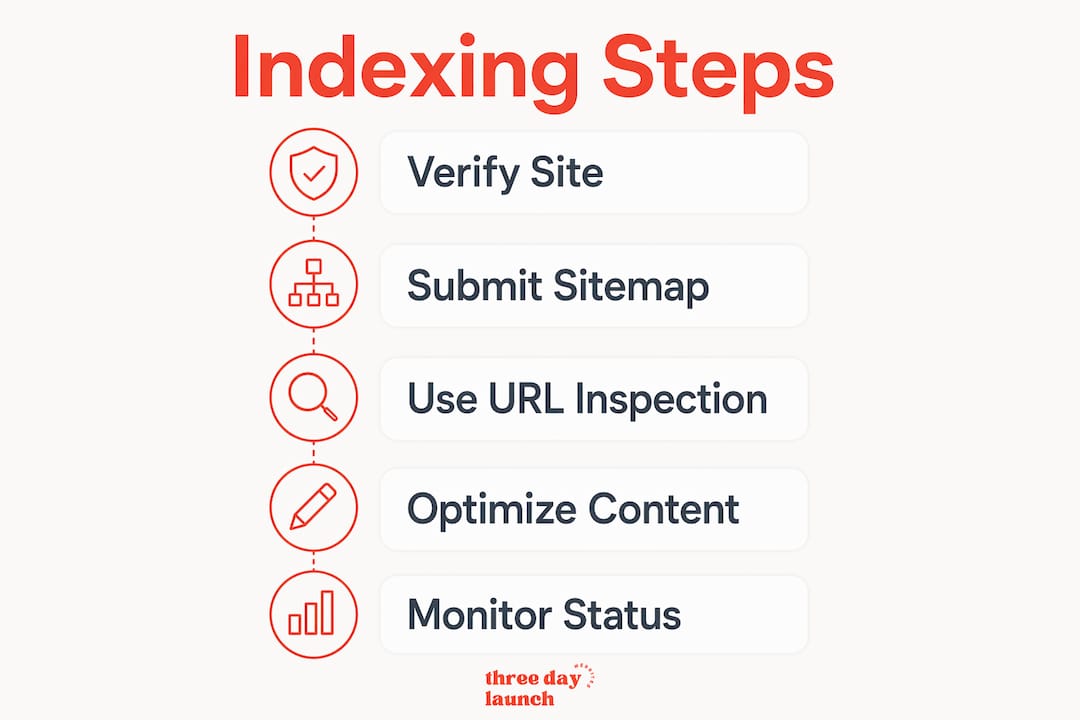
Verifying your site in Google Search Console and submitting an XML sitemap speeds up Google indexing significantly. This is the single most important technical step you can take, and it costs nothing.
Here is how to do it:
- Go to Google Search Console at search.google.com/search-console and sign in with your Google account.
- Add your property. Choose "Domain" if you want to cover all versions of your site (http, https, www, non-www). Paste your domain and click Continue.
- Verify ownership. The easiest method is adding a DNS TXT record through your domain registrar. If that feels technical, most website platforms like WordPress, Squarespace, or Wix offer one-click verification through an HTML tag method.
- Find your sitemap URL. Most CMS platforms generate sitemaps automatically. For WordPress, it is usually yoursite.com/sitemap.xml or yoursite.com/sitemap_index.xml. For Squarespace, it is yoursite.com/sitemap.xml by default.
- Submit the sitemap. In Search Console, click "Sitemaps" in the left menu, paste your sitemap URL, and hit Submit.
Your sitemap tells Google exactly which pages exist and which ones matter most. Prioritize pages like your homepage, your services page, your about page, and any lead-generating landing pages. These are the pages that convert visitors into clients, so Google needs to find them first.
Pro Tip: After submitting your sitemap, check back in 48–72 hours. Search Console will show you how many pages were submitted versus how many were indexed. If the numbers do not match, click into the coverage report to see what is blocking specific pages.
How to use the URL Inspection tool to request indexing
The URL Inspection tool inside Google Search Console lets you check the status of any individual page and ask Google to crawl it right away. Inspecting a URL and requesting indexing is the fastest way to get a specific page into Google's database.

Use this tool strategically. Do not request indexing for every page at once. Google limits how many requests you can make per day, so focus on your highest-value pages first.
Here is how to prioritize:
- Your homepage. This is your most authoritative page and the anchor for everything else.
- Your coaching services page. This is what clients search for directly.
- Your contact or booking page. Getting this indexed means clients can find a way to reach you fast.
- Any new blog posts or landing pages you want to rank quickly.
Paste the full URL into the inspection bar at the top of Search Console, wait for the status check, then click "Request Indexing." Google typically processes these requests within a few days. You will not get a confirmation email, but you can re-inspect the URL after a few days to see if the status has changed to "URL is on Google."
One thing coaches often miss: internal linking with descriptive anchor text signals page importance to Google and improves indexing speed. Link your new pages from your homepage or from existing blog posts. This gives Google's bots a clear path to find and crawl them without waiting for a manual request.
How to optimize Google Business Profile for local coaching visibility
Google Business Profile setup is the fastest way to improve local discovery for coaching businesses. Setup takes about 20 minutes and puts you in Google's map pack, which appears above organic results for local searches like "life coach near me" or "executive coach in Austin."
Follow these steps to get it right:
- Claim your profile at business.google.com. Search for your business name first to avoid creating a duplicate.
- Add consistent NAP information. NAP stands for Name, Address, and Phone number. Use the exact same format across your website, your profile, and any other directories. Inconsistency confuses Google and weakens your local ranking.
- Choose the right category. "Life Coach," "Business Management Consultant," or "Health Coach" are all recognized categories. Pick the one that matches your primary service.
- Write a clear business description. Mention your specialty, who you serve, and your location or service area. Keep it under 750 characters.
- Encourage client reviews. Google reviews are the strongest E-E-A-T signal for local coaching businesses. Send clients a direct review link after a session. Honest, specific reviews build trust with both Google and prospective clients.
Pro Tip: If you coach online and do not have a physical office, you can still verify your Google Business Profile as a service-area business. During setup, choose "I deliver goods and services to my customers" and hide your home address. You still get all the local visibility benefits without listing a personal address publicly.
AI search tools in 2026 use Google Business Profile data to validate whether a coaching business is a real, trustworthy entity. A complete, verified profile with reviews tells AI systems that you are credible. That matters when AI Overviews and tools like Perplexity decide whose coaching services to recommend.
How do AI crawlers affect coaching site indexing in 2026?
Enabling AI crawlers like GPTBot and publishing llms.txt files at your site root boosts AI-driven indexing and citation. Blocking these crawlers in 2026 is the equivalent of de-indexing yourself from an entire category of search. That is not a risk worth taking.
Let's Launch Your Strategic Coaching Website
Your first step is to book a free call so we can get your questions answered.
Book A Free CallHere is a comparison of the key practices for traditional Google indexing versus AI search optimization:
| Practice | Traditional Google indexing | AI search optimization |
|---|---|---|
| Sitemap submission | Required via Search Console | Supports AI crawler discovery |
| Robots.txt | Must allow Googlebot | Must also allow GPTBot, ClaudeBot |
| Structured data | Helpful for rich results | Required for AI entity recognition |
| Content ownership | Publish on your domain | Publish on your domain first before third-party platforms |
| Keyword targeting | Match search queries | Match conversational AI prompts |
Publishing content on your own domain before syndicating it to platforms like Substack or Medium is critical. If a third-party platform publishes your content first, search engines may credit that platform instead of your site. Use canonical tags when you do republish elsewhere to protect your indexing authority.
Structured data using JSON-LD from schema.org helps Google and AI agents understand your coaching site content. Implement schemas for Organization, Person, and FAQPage. Make sure the structured data matches exactly what is visible on the page. Mismatches confuse crawlers and can trigger manual penalties.
Pro Tip: Use the free robots.txt checker to confirm that your file allows GPTBot, ClaudeBot, and Googlebot. A single accidental "Disallow: /" line blocks every crawler from your entire site.
Targeting niche-specific coaching keywords outperforms generic service terms for indexing and ranking. A page optimized for "career coach for tech VPs" outranks a generic "career coaching services" page because it matches a specific search intent. Write content for a defined coaching persona, not for everyone.
Key takeaways
Getting your coaching site indexed on Google requires a layered approach: verify in Search Console, submit a sitemap, optimize your Google Business Profile, and open your site to AI crawlers with proper structured data.
| Point | Details |
|---|---|
| Submit your sitemap first | Verify in Google Search Console and submit your XML sitemap to speed up discovery. |
| Use URL Inspection for priority pages | Request indexing manually for your homepage, services page, and booking page first. |
| Claim your Google Business Profile | A complete GBP with client reviews boosts local visibility and AI entity trust. |
| Allow AI crawlers in robots.txt | Enable GPTBot and ClaudeBot so AI search tools can find and cite your coaching site. |
| Publish content on your own domain | Always post on your site first to retain indexing authority before sharing elsewhere. |
What coaches get wrong about indexing (and what actually works)
Here is the honest truth from working with coaches on their websites: most indexing problems are not technical. They are strategic. Coaches spend hours tweaking fonts and colors while their robots.txt file quietly blocks every crawler on the internet. The technical fixes in this article take a few hours total. The strategic mindset shift takes longer.
Entity clarity and consistency across your website and online profiles matter more than technical SEO tweaks for coaching site visibility in 2026. That means your name, your specialty, your location, and your credentials need to appear consistently everywhere. Google and AI tools are trying to answer one question: "Is this a real, trustworthy coaching business?" Your job is to make that answer obvious.
The coaches who get cited by AI tools and rank well on Google are not the ones with the most backlinks. They are the ones with clear, consistent identities, verified profiles, and content that directly answers the questions their ideal clients are typing into search. Generic pages about "coaching services" do not cut it anymore. Specific pages about "executive coaching for first-time managers" do.
AI search engines prioritize E-E-A-T, which stands for Experience, Expertise, Authoritativeness, and Trustworthiness. Enabling AI crawlers and structuring your content accordingly is not optional in 2026. It is the baseline. Coaches who treat AI optimization as a separate task from SEO are doubling their workload unnecessarily. Build it in from the start, and your site compounds in visibility over time.
The essential SEO strategies for 2026 all point in the same direction: own your content, clarify your identity, and stay consistent. That is advice that works whether Google's algorithm updates three times this year or thirty times.
How Three Day Launch gets coaches visible fast
Getting indexed is only possible if your site is built correctly from day one. A poorly structured site with missing metadata, no sitemap, and blocked crawlers will fight you at every step.
Three Day Launch builds custom coaching websites in three days with SEO and indexing best practices built directly into the structure. That means your sitemap is ready, your metadata is set, your structured data is in place, and your site is open to both Google and AI crawlers from the moment it goes live. Coaches in life, health, finance, and executive fields have used Three Day Launch to go from invisible to generating organic leads within weeks of launch. If you want a site that Google can actually find, Three Day Launch is where to start.
FAQ
How long does it take Google to index a new coaching site?
Google typically indexes a new site within a few days to a few weeks after sitemap submission and URL Inspection requests. Submitting your sitemap through Google Search Console and requesting indexing for priority pages speeds up the process significantly.
Is Google indexing free for coaching websites?
Organic indexing is free and Google does not allow payment to influence it. You can speed up discovery using Google Search Console tools and correct site structure, but ranking is earned through content quality and authority.
What is the difference between indexing and ranking?
Indexing means Google has stored your page in its database. Ranking means Google has decided where that page appears in search results. You must be indexed before you can rank for any search term.
Do online coaches without a physical office qualify for Google Business Profile?
Yes. Service-area businesses can verify a Google Business Profile while hiding their physical address. This gives online coaches full access to local map pack visibility without listing a home address publicly.
Why is my coaching site indexed but not ranking?
Indexing confirms Google knows your page exists. Ranking depends on content relevance, authority, site speed, and how well your pages match specific search intent. Niche-specific content targeting defined coaching personas consistently outranks generic service pages.